







Image enhancement is a powerful technique used to enhance photo details of digital images. It involves using various methods and algorithms to improve the visual appearance of an image, such as increasing its sharpness, adjusting its color balance, reducing noise, and enhancing its overall clarity. An image quality enhancer software can be a bit tricky to get used to, especially for beginners, since they’re filled with tools and options.
Considering this, you can consider VanceAI Image Enhancer, which is an AI image enhancer tool from VanceAI that can be used online and offline to enhance photo quality. Besides this, the image enhancer tool comes with many other benefits, such as an efficient UI, that makes the whole process welcoming to beginners and new users.
This review examines the AI Image Enhancer and where it can be used.
Various Uses of Enhanced Images
Photo quality enhancer tools have the potential to enhance product photos and other visuals used in business in various ways. A prevalent method used by these tools is to enhance the sharpness and detail of the image, which can effectively highlight the product or service and improve its overall presentation.
Imagine you run an online store that sells handmade jewelry, and you’re looking to improve the quality of the product photos you use to showcase your pieces. You take a photo of a beautiful pair of earrings, but upon review, you notice that the image is slightly blurry and lacks detail. This is where an image enhancer tool can come in handy. Not to mention that VanceAI offers other tools that complement the image enhancer. By uploading the photo into the tool, you can apply various enhancements to improve the image’s quality. For instance, you can use the sharpening tool to increase the image’s sharpness and definition, making the earrings’ intricate details stand out.


In the world of art and design, image enhancers are used to enhance the quality of digital artwork, photographs, and other visuals used in advertising, marketing, and branding. In short, an image enhancer can be used in any field that relies on digital images to improve the quality, accuracy, and visual impact of these images.
These tools utilize sophisticated algorithms and AI technologies to scrutinize the image and enhance its quality. They can modify the brightness and contrast of the image, which leads to a more lucid and visible image. Additionally, they can also increase the image resolution, which results in a sharper and more intricate image
Enhance Photo Details Easily with VanceAI Image Enhancer
VanceAI Image Enhancer makes image enhancement easy by providing a user-friendly interface that’s easy to navigate. The platform is designed to be intuitive, with simple tools and easy-to-understand instructions that guide users through the process. Users can choose from a variety of enhancements, such as increasing the sharpness, brightness, or contrast of the image, or they can apply more advanced enhancements, such as removing noise or improving the color balance.
VanceAI is an AI based platform with many tools to offer. So far, it provides users with more than 15 image editing and enhancement tools. What’s more is that the platform has features such as Workflow and Workspace that really bring these tools together. For instance, if you want to remove image noise from an image and enhance it, you can use the Workflow AI Super HD feature to use VanceAI Image Denoiser and Image Upscaler together. It’s also making strides in gaining accessibility by introducing VanceAI PC and VanceAI JA. The former is the software version of VanceAI whereas the latter is the Japanese version of the platform.
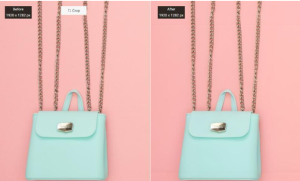

We can clearly see that the AI photo enhancer improves the image all around. First, the background no longer looks faded and now has a solid look. It helps to create the intended contrast of the photo. Next, the image enhancer emboldens the colors of the product itself. The After image, as a result, looks much more authentic and professional. Not to mention that a photo of such quality is more likely to get attention and positive responses from viewers online.
How to Use VanceAI Image Enhancer
Use Photo Enhancer as shown in the guide below to enhance photos easily.
Step 1: Click on the above link to access the online photo enhancer online. After that, use the Upload Image option to proceed ahead.
Step 2: Inside VanceAI Enhancer Workspace, users can upload images, use the features for customization, and click on Start to Process to start enhancing the image.
Step 3: After a few seconds, the final image will be shown in the Workspace. Click on Download Image to save the image on your device.
Using VanceAI Image Enhancer Offline on VanceAI PC
Step 1: Click on VanceAI PC to go to the info page of the software. From there, click on Free Download to get the setup on your system. The Buy Now button gets you to the subscription page.
Step 2: Start the setup file and install the software on your device. After that, open up the software and click on Enlarge to open the Workspace.
Step 3: Upload the image, use the features, and click on the Save option to download the image.
Final Verdict
The VanceAI Image Enhancer is a tool that can help businesses improve the quality of their e-commerce and product photos to achieve a professional-grade appearance, and at a reasonable cost. This can significantly impact the success of the business because high-quality images are more likely to capture the attention of potential customers, leading to increased sales.
Apart from enhancing the visual appeal and quality of product photos, VanceAI offers additional features that make it an attractive option for users who require photo enhancement tools. For a subscription fee of $4.95 per month, users can access 100 image credits, which provides access to advanced features like batch processing and expedited processing times. This makes VanceAI an affordable choice for both occasional and frequent users who require high-quality images.
More Options from VanceAI
VanceAI is a dynamic platform that is continuously improving and expanding. It currently offers 18 image editing tools that are both practical and useful. But that’s not all. VanceAI is also highly accessible. Users have the option to use VanceAI’s PC software, or they can opt to use VanceAI JA, which is a Japanese language website provided by VanceAI. Moreover, the application has offered an API version of its app for quite some time now.
One of the most noteworthy features of VanceAI is its Workflow functionality, which empowers users to combine multiple tools and create a single algorithm to enhance their images. For example, a user can choose to use VanceAI Image Denoiser with VanceAI Image Upscaler, or VanceAI Image Sharpener with other VanceAI tools, all for the same image. This feature gives users the flexibility and control to achieve higher-quality images.
In addition to image editing, VanceAI also provides an AI photo editor, an all-in-one tool that allows you to edit pictures with just several simple clicks, and VancePDF.com, an online PDF processing application that offers several useful features such as merging, compressing, and splitting PDFs, among others.


