







Online businesses have been faced with a lot of challenges when it comes to showcasing their products and services to the global world. The greatest challenge is majorly on how to create engaging and high-quality content that will attract the attention of potential customers to buy their products. This is where CapCut comes in.
Introduction to CapCut online video editor tool
CapCut is a video editor online free tool that offers different features that can be used to create and edit videos that will perfectly meet your needs. It can be used with either your desktop or laptop computer. It has a web browser and app. Anyone can edit with the CapCut Video editor tool due to its User-friendly interface that makes it easy to create outstanding and unique videos, without any prior experience in video editing.
CapCut can also be used to drastically improve your online sales. In this article, we will explain how you can use CapCut videos to improve your online businesses, the needed step by step guidelines and professional format to follow that can boost and move your business to the next level.
Main Features of CapCut Online Video Editor Tool
Some of the key features of CapCut online video editor tool that can be used to improve your online business include;
#1. Speech to Text


CapCut’s speech to text feature enables users to transcribe the speech in their videos into text format for caption purposes. This feature gives the video accessibility and wider view to reach a lot of targeted audience and potential customers.
#2. Background Removal

#3. Video Resizing
This feature enables users to adjust the size of their videos to be able to fit different platforms and screen sizes. It provides users with the opportunity to optimize their videos to be suitable for different social media platforms, such as Facebook, Instagram, Twitter, TikTok etc.
#4. Text to Speech
This feature enables users to convert their written text to speech for business purposes. It offers users the ability to create voice overs and add narration to their online videos.
#5. Effects and Filters
CapCut’s effects and filters feature enable users to have a unique look for their online videos. Users can select and add any filter that matches their taste or class. CapCuts filter types include vintage, black and white filters. Various animation effects such as slow motion, fast motion, or reverse playback can also be added to the video to make it fun and enjoyable to the viewers. The fact that Users can also apply these effects and filters on their own with just a few clicks, makes the editing process a loving job to do.
CapCut Free Online Video Editor: Advanced Features
CapCut has a number of advanced features, different from the ones stated above. These features offer additional benefits to users and improve the eventual outcome of their online video. These advanced features include;
#1. Green screen and Background remover
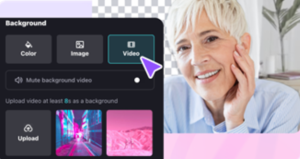
CapCut’s free online video editor enables businesses and individuals to easily remove the background of their portrait videos and replace them with any of their choice image. The background color can also be changed to have a green screen effect. Its automatic recognition technology features also enable users to edit their videos within the shortest possible time.
#2. Multiple ready to use templates
CapCut free online video editor offers users with a lot of online ready to use templates to give their videos an amazing and irresistible outlook. A good template selection will allow you to initiate your video creation journey immediately and attract more online views in the long term. These templates can also be used to create a brand name for your business, to make it unique and stand out in the online space.
#3. Auto-text Feature
CapCut’s online auto-text feature allows users to use the auto-caption and auto-subtitle functions to generate easy to use video texts. Most of the videos uploaded on CapCut can be used to auto-generate texts which can be easily shared with the end users for easy access and prompt response.
#4. Music and Sound Effects
CapCut’s music and sound effects features, allows users to access a vast collection of music tracks and sounds, capturing different genres and moods. Users can use its easy-to-use interface to browse and search for video tracks and sounds that meet their business needs.
Users can also add background music or sound effects to their online videos using the CapCut app, making the video have a more engaging and professional look. Whether you are creating a personal blog or online video to improve your marketing needs, the Capcut’s library app containing licensed music and sound effects can be used to elevate your videos to the next level.
How to Use CapCut Web For Your Online Business.
Some of the ways that CapCut Web can be used to improve your online business include:
#1. Social media leveraging
With CapCut Web, users can bring their ideas to life and create high-quality videos quickly and easily using the social media platforms such as; Facebook, Instagram, Twitter, TikTok and LinkedIn. These platforms can be used to create irresistible advertising and targeting options, vast audience accessibility and cost-effective solutions for your business needs. CapCut Web is an ideal video editing tool for people who want to create and edit videos to make their business grow and thrive fast. With the increasing popularity of social media platforms, CapCut’s features make it easier for users to produce engaging and rewarding content.
The app’s user-friendly interface provides users with a smooth and seamless editing experience. The speech-to-text feature enables users to add captions and subtitles to their videos, making it easier to reach a large audience. The background removal feature also affords the users with the opportunity to replace a video’s original background with a new one, thereby adding creativity to their videos.
With CapCut’s video cropper feature, businesses can easily create videos in the recommended area for different social media platforms. This feature ensures that the videos look great and professional on every social media platform.
#2. Unique Video creation
CapCut Web can be used to create unique and outstanding videos for promotional business purposes. The app’s easy-to-use interface and advanced features make it easy for creating high-quality marketing materials. CapCut helps you to create advertisements, product demos, and other video content to promote your online products and services.
CapCut’s ability to remove backgrounds from videos makes it one of the most useful tools for business growth and expansion. This feature allows businesses to have full control over their products and services without any background distraction. Additionally, CapCut’s text overlay feature also helps to add captions and text elements to videos, making them more informative and engaging for viewers.
CapCut’s ability to quickly adjust video sizes to fit different platforms is another major feature for your business growth. The CapCut’s vast library of licensed music and sound effects enables users to add unique background music and sound effects to their online videos. With a wide range of music genres and sound effects, businesses can choose the perfect background music to match the tone of their online video contents.
#3. Non-profit organizations needs
CapCut Web can be used to create online videos for non-profit organizations such as Orphanage baby homes and refugees. Their leaders can use the app to create instructional videos or presentations that are useful for their wards and staff to have informative and engaging contents. With the CapCut’s user-friendly interface and rich features, including speech-to-text and text overlay, the Web will make it easy for non-profit organizations to create videos that are accessible and engaging to all viewers for needed support and assistance.
#4. Documentation purposes
CapCut Web can be used to keep various marketing projects or presentations that are professional, for future reference and further usage. Whether it’s a seminar project, a business trip, or a personal project, the app can be used to create amazing videos that are exceptionally appealing and that can be referenced later in life.
Conclusion
CapCut is an amazing online video editing tool that can be used to improve your online business advertisements. Its user-friendly interface and unique features make it easy for anyone to create unique and outstanding videos without any prior knowledge in video editing. With CapCut, your online business will begin to have an amazing number of views, likes and comments from potential customers. This will eventually lead to higher sales and boost your products visibility.


